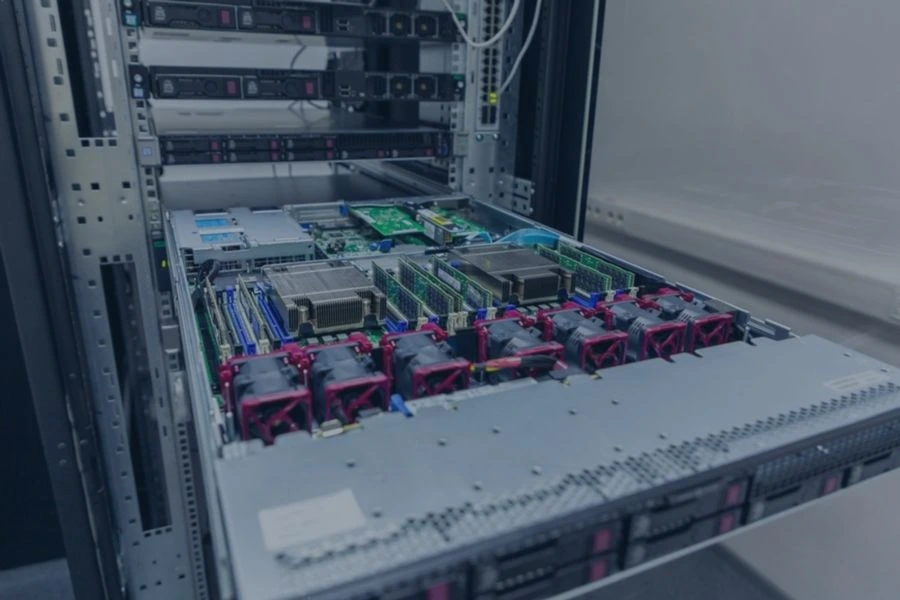
Inside a physical server are the components responsible for processing, storing, moving, and protecting data. These typically include processors, memory, storage drives, a motherboard, networking hardware, power supplies, and cooling equipment.
Servers are built to handle heavier workloads and longer operating periods than most consumer computers, so they often use higher-capacity hardware, multiple drives, redundant power systems, and specialized networking components. Businesses replacing or decommissioning old servers can work with EACR Inc. for secure server recycling.
What Components Are Inside a Server?
A typical physical server may contain:
- CPU or processors
- Motherboard
- RAM
- HDDs, SSDs, or NVMe storage
- Network interface cards
- Power supplies
- Cooling fans and heat sinks
- GPUs or other accelerators
- RAID or storage controllers
- Expansion cards
- Internal cables and connectors
The exact hardware depends on what the server is designed to do. A basic file server may have a relatively straightforward configuration, while a database, virtualization, or AI server may use much more memory, storage, processing power, or specialized hardware.
The Main Parts Inside a Server
Central Processing Unit
The central processing unit, or CPU, is the main processor inside a server. It executes instructions, performs calculations, and coordinates many of the processes that keep applications and operating systems running.
Depending on the system, a server may contain:
- One physical processor
- Multiple physical processors
- Processors with many individual cores
More cores and processing capacity allow a server to handle more work at the same time. This is especially important for workloads such as databases, virtual machines, websites, enterprise applications, and other systems that may need to process many requests continuously.
Motherboard
The motherboard is the main circuit board that connects the server’s internal components.
It provides connections for hardware such as:
- CPUs
- RAM
- Storage controllers
- Network hardware
- Expansion cards
- Power connections
- Other internal components
The motherboard allows these parts to communicate with one another and operate as a complete system. It also determines many of the server’s hardware limits, including the processors, memory, storage interfaces, and expansion hardware the system can support.
RAM
Random access memory, or RAM, is the server’s temporary working memory.
While the server is running, the CPU uses RAM to quickly access information needed for active applications and processes. Unlike an HDD or SSD, RAM generally does not retain this information after the server is powered off.
Servers may contain large amounts of RAM because many business workloads depend on having substantial amounts of active data immediately available.
More memory can be especially important for:
- Databases
- Virtual machines
- Enterprise software
- High-volume applications
- Large processing workloads
In simple terms, storage keeps data long term, while RAM gives the server fast access to information it is actively using.
Server Storage Drives
Storage drives hold operating systems, applications, databases, files, and other information that needs to remain available after the server shuts down.
Servers may use several types of storage, often with multiple drives installed in the same system.
Hard Disk Drives
Hard disk drives, or HDDs, store data magnetically on spinning platters.
They are commonly used when organizations need significant storage capacity and cost per gigabyte matters. Enterprise HDDs are often built for heavier workloads and longer operating periods than typical consumer drives.
Because these drives can contain sensitive business information, they also need to be handled carefully when a server reaches the end of its useful life. Businesses retiring servers can learn more in our hard drive recycling guide.
Solid-State Drives
Solid-state drives, or SSDs, store information using flash memory rather than moving mechanical parts.
They generally provide faster access to data than traditional hard drives and are commonly used for applications where speed and responsiveness matter.
Servers may use SSDs for:
- Operating systems
- Databases
- Applications
- High-performance storage
- Frequently accessed data
Like HDDs, SSDs may continue to hold data after the server is powered off.
NVMe Drives
NVMe drives are solid-state storage devices designed to communicate through high-speed interfaces.
They can provide very fast data transfer and low latency, making them useful for workloads that need rapid access to large amounts of information.
NVMe storage is increasingly common in modern enterprise servers, particularly in systems supporting databases, virtualization, analytics, and other high-performance workloads.
A server may contain several HDDs, SSDs, or NVMe drives depending on its storage capacity, performance, and redundancy requirements.
Network Interface Cards
Network interface cards, or NICs, allow a server to communicate with other devices and systems.
These connections may link the server to:
- Other servers
- Employee computers
- Storage systems
- Local networks
- Data centers
- The Internet
Enterprise servers may use several network connections at once. They may also support higher-speed networking hardware than an ordinary desktop computer, especially in data centers where large amounts of information move between systems continuously.
Power Supplies
A server’s power supply converts incoming electricity into the power needed by the motherboard, processors, drives, fans, and other internal hardware.
Many enterprise servers use redundant power supplies, meaning two or more power supply units are installed in the same system.
If one power supply fails, another may continue providing power. This can help reduce unexpected downtime and allow certain maintenance tasks to be performed without immediately shutting down the server.
Redundant power supplies are one of the more noticeable differences between many enterprise servers and standard desktop computers.
Cooling Fans and Heat Sinks
Servers generate a significant amount of heat, especially when processors, memory, storage, GPUs, and power supplies are operating continuously.
Cooling hardware can include:
- High-speed fans
- Heat sinks
- Airflow channels
- Temperature sensors
Heat sinks draw heat away from components such as CPUs and GPUs, while fans move hot air out of the system.
Cooling is particularly important in server racks and data centers, where many systems may operate close together around the clock. Without adequate airflow and temperature control, excessive heat can reduce performance, damage components, or shorten hardware lifespan.
Other Components You May Find Inside a Server
Not every server contains the same hardware. Some systems include additional components based on the workload they are built to handle.
GPUs and AI Accelerators
Some servers contain one or more graphics processing units, or GPUs.
GPUs were originally associated mainly with graphics-heavy applications, but they are now widely used for workloads that require large amounts of parallel processing, including:
- Artificial intelligence
- Machine learning
- Large language models
- Scientific computing
- Video processing
AI-focused servers may contain several high-performance GPUs or other accelerators. Those systems often need more power, more cooling, and higher-speed internal connections than a standard server.
RAID and Storage Controllers
Storage controllers help a server manage multiple drives.
A RAID controller can organize several HDDs or SSDs into a larger storage system designed around goals such as:
- Better performance
- Data redundancy
- Storage availability
These controllers are especially common in systems where losing access to a single drive cannot be allowed to take important data or applications offline.
Expansion Cards
Servers may also contain additional PCIe or other expansion cards.
These can support functions such as:
- Additional networking
- Storage connections
- GPUs
- Specialized processing
- Fiber-optic connectivity
The exact cards inside a server depend on what the system was built to do.
Why Do Servers Have Multiple or Redundant Components?
Many organizations rely on servers for systems that need to remain available for long periods without interruption.
That is why enterprise servers may include:
- Multiple processors
- Several storage drives
- Multiple network connections
- Redundant power supplies
- Additional cooling fans
Redundancy gives the system another path if one component fails. For example, a second power supply may continue powering the server if the first one stops working.
This does not make a server immune to failure, but it can reduce downtime and make certain repairs or replacements easier to manage. Want to know when aging hardware should be replaced? Learn how long servers typically last and the signs that it may be time for an upgrade.
What Materials Are Found Inside a Server?
A server contains a mix of electronic, plastic, and metal components.
Common materials include:
- Steel
- Aluminum
- Copper
- Plastics
- Printed circuit boards
- Semiconductor materials
- Other metals used in electronic components
Different parts of the server contain different material combinations.
For example:
- Cases and chassis may contain steel or aluminum.
- Wiring and power components commonly contain copper.
- Motherboards and expansion cards contain printed circuit boards and electronic components.
- Heat sinks are often made from aluminum or copper.
- Storage drives contain metals, circuit boards, magnets, and other materials.
The exact material mix depends on the server’s design, age, and hardware configuration.
Which Server Components Can Store Data?
One of the most important things to understand about old servers is that some components may continue storing information after the system has been shut down.
HDDs, SSDs, and NVMe Drives
Hard drives, solid-state drives, and NVMe drives are the most obvious data-bearing components inside a server.
Depending on how the system was used, they may contain:
- Business documents
- Databases
- Customer information
- Application data
- Login credentials
- Operating systems
- Backups
Because this information can remain on the drive after the server is powered off, storage devices should be addressed as part of any server retirement or recycling project.
Other Data-Bearing Hardware
Storage drives are not always the only components capable of retaining information.
Some servers or related systems may also contain:
- Embedded flash memory
- Storage controllers with cache or onboard memory
- Specialized cards with retained configuration data
- Connected storage appliances
That is why businesses should not automatically assume that removing the most visible hard drives resolves every data-security concern.
EACR Inc. provides secure data destruction services alongside electronics recycling and server decommissioning for organizations retiring data-bearing hardware.
What Happens to Server Components at End of Life?
When a physical server reaches the end of its useful life, businesses generally need to address two separate issues:
- Data security on storage drives and other data-bearing components.
- Responsible recycling or disposition of the remaining hardware.
Once those concerns are addressed, components can be separated and routed into appropriate electronics recycling and material recovery streams.
For a deeper look at the process, including server removal, racks, staging, data destruction, and documentation, read our guide to server recycling and rack removal.
Frequently Asked Questions About What’s Inside a Server
What are the main components inside a server?
A typical physical server contains processors, a motherboard, RAM, storage drives, networking hardware, power supplies, and cooling equipment. Some servers also include GPUs, RAID controllers, and specialized expansion cards.
Do servers have hard drives?
Many servers use HDDs, SSDs, NVMe drives, or a combination of storage technologies. Enterprise servers may contain multiple drives for additional capacity, performance, or redundancy.
Do servers have GPUs?
Some do. GPUs are especially common in servers used for artificial intelligence, machine learning, video processing, scientific computing, and other workloads that benefit from parallel processing.
Do servers have more than one CPU?
Some enterprise servers contain multiple physical processors, while others use one processor with many individual cores. The exact configuration depends on the system and workload.
Why do servers have multiple power supplies?
Many servers use redundant power supplies so another unit can continue supplying power if one fails or needs service. This can help reduce unexpected downtime.
Which parts of a server contain data?
HDDs, SSDs, and NVMe drives are the main persistent data-storage components. Some specialized cards, controllers, or embedded memory may also retain information.
What metals are found inside servers?
Servers can contain steel, aluminum, copper, and other metals used in circuit boards, connectors, storage drives, power components, and cooling hardware.
Can old server components be recycled?
Many end-of-life server components can enter electronics recycling and material recovery streams. Data-bearing devices should also be handled appropriately as part of the recycling or disposition process.
Conclusion
A physical server is made up of specialized hardware working together. CPUs process instructions, RAM provides temporary working memory, storage drives hold persistent data, network cards handle communication, power supplies deliver electricity, and cooling systems help keep everything operating safely.
When a server reaches the end of its useful life, both the hardware and the data it contains need to be considered. Businesses replacing individual servers or decommissioning larger server environments can work with EACR Inc. for secure server recycling services, and data destruction.