Most printers last between 3 and 7 years, but the actual lifespan depends on the type of printer, how often it is used, and how well it is maintained.
Inkjet printers, laser printers, and larger commercial machines can have very different lifespans. Age alone also does not mean a printer needs to be replaced. Print quality, repair frequency, available replacement parts, workload, and whether the machine still meets your needs all matter.
If your printer has reached the end of its useful life, EACR Inc. provides printer recycling services for businesses, schools, offices, and organizations managing old printing equipment.
Quick answer: Most printers last about 3 to 7 years.
Some inexpensive home printers may need replacement sooner, while well maintained office and commercial printers can stay in service for a decade or longer.
Typical lifespan ranges include:
- Home inkjet printer: 2 to 5 years
- Office laser printer: 5 to 10 years
- Commercial or wide format printer: 7 to 15+ years
These are general ranges rather than expiration dates. A lightly used five year old laser printer may still have years of service left, while a heavily used printer of the same age may already be experiencing major mechanical problems.
Average Printer Lifespan by Type
How Long Do Inkjet Printers Last?
Typical lifespan: 2 to 5 years
Home inkjet printers generally have shorter lifespans than larger office machines. They are often designed for lighter workloads and rely on liquid ink, which introduces its own maintenance problems.
Common issues include:
- Clogged printheads
- Dried ink
- Worn paper rollers
- Repeated paper feeding problems
- Mechanical wear from heavy printing
Interestingly, using an inkjet printer too little can also cause problems.
If an inkjet sits unused for months, liquid ink may dry inside the printhead or nozzles. That can result in clogged components, missing colors, streaking, or a printer that no longer produces usable prints.
Regular light use can sometimes be better for an inkjet than allowing it to sit unused for long periods.
How Long Do Laser Printers Last?
Typical lifespan: 5 to 10 years
Laser printers are generally built for heavier workloads than typical home inkjet printers.
Instead of liquid ink, they use toner and are commonly found in:
- Offices
- Schools
- Businesses
- Libraries
- Healthcare facilities
- Other environments with regular printing needs
A laser printer may need maintenance before the entire machine needs replacement.
Rollers, drums, fusers, transfer components, and other parts can wear over time. Replacing these components can extend the printer’s usable life if the rest of the machine is still operating correctly.
A good office laser printer that receives regular maintenance can remain useful well beyond the average lifespan of a basic home inkjet.
How Long Do Commercial Printers Last?
Typical lifespan: 7 to 15+ years
Commercial printers and wide format printers are designed for larger workloads and longer service lives.
These machines may continue operating for many years when they receive regular cleaning, servicing, and replacement parts.
Eventually, however, keeping an older commercial printer running can stop making practical sense.
Businesses may decide to replace one because:
- Repairs are becoming expensive
- Replacement parts are difficult to find
- Downtime is disrupting operations
- Print speed no longer meets demand
- Software or network compatibility becomes outdated
- A newer machine can handle the workload more efficiently
In many cases, the printer does not completely stop working before replacement. It simply becomes less practical to keep operating.
What Affects How Long a Printer Lasts?
Two identical printers can have completely different lifespans depending on how they are used and maintained.
How Often You Print
Printer usage needs a balance.
Heavy printing puts more wear on rollers, motors, gears, paper feeding systems, and other moving components.
Very little printing can also create problems, particularly with inkjet printers. When liquid ink sits unused for long periods, it can dry and clog the printhead.
The best usage pattern depends on the type of printer and what it was designed to handle.
Printer Workload
Printers are designed around expected workloads.
Manufacturers commonly provide a recommended monthly page volume or duty cycle that gives users an idea of how much printing a machine is built to handle.
Consistently printing far beyond that level can accelerate wear.
For example, a small home printer designed for occasional documents is not going to handle thousands of pages every month as well as an office laser printer built for that workload.
Choosing a printer that matches the amount of printing you actually do can have a major effect on how long it lasts.
Maintenance and Cleaning
Basic maintenance can help prevent small problems from becoming larger ones.
That can include:
- Removing accumulated dust
- Keeping paper paths clean
- Replacing worn rollers or other service parts
- Clearing paper jams correctly
- Using appropriate ink or toner
- Following the manufacturer’s cleaning recommendations
Commercial printers may also have scheduled maintenance intervals for specific components.
Ignoring repeated jams, unusual noises, poor print quality, or other warning signs can allow a manageable problem to become a more expensive repair.
Where the Printer Is Stored
The environment around a printer matters more than many people realize.
Dust can accumulate around internal electronics and moving parts. Humidity can affect paper feeding and electrical components. Extreme temperatures can also affect ink, toner, plastic parts, and electronics.
A printer sitting in a hot garage, damp basement, or dusty warehouse may age differently from the same machine operating in a clean, climate controlled office.
Keeping the printer somewhere dry, reasonably clean, and protected from extreme temperatures can help extend its usable life.
Signs Your Printer May Be Near the End of Its Life
One problem does not necessarily mean a printer needs to be replaced.
Repeated problems are more concerning.
Frequent Paper Jams
Every printer jams occasionally.
If paper jams become constant, however, worn rollers, feeding mechanisms, sensors, or other internal components may be causing the problem.
A repair may solve it. If multiple feeding components are worn and the printer is already old, replacement may make more sense.
Declining Print Quality
Common warning signs include:
- Streaking
- Faded printing
- Horizontal or vertical lines
- Missing colors
- Blurry text
- Repeated marks or print defects
Always rule out the obvious causes first.
A worn cartridge, low toner, clogged printhead, dirty component, or maintenance part can sometimes cause poor print quality without anything being seriously wrong with the printer itself.
When problems continue after those issues have been addressed, the printer may be approaching the end of its practical lifespan.
Repairs Are Becoming Frequent
One repair does not necessarily justify replacing a printer.
A pattern of repairs might.
If the printer repeatedly needs service, causes downtime, or requires increasingly expensive parts, keeping it alive can eventually cost more than replacing it.
Businesses should also consider the cost of employees waiting for an unreliable printer or repeatedly dealing with equipment problems.
Replacement Parts Are Hard to Find
Older printers can become difficult to maintain even when the machine itself is repairable.
Manufacturers eventually discontinue parts, supplies, drivers, and support for older models.
If a basic repair requires searching for discontinued components or relying on increasingly limited supplies, that is often a sign that replacement should at least be considered.
The Printer No Longer Fits Your Needs
A printer can still work perfectly and still be ready for retirement.
A business may replace a printer because:
- Printing volume has increased
- The printer is too slow
- Current computers no longer support it properly
- Networking features are outdated
- Energy use is higher than newer equipment
- Scanning or document management needs have changed
- The organization needs a larger or more capable system
Working and useful are not always the same thing.
Should You Repair or Replace an Old Printer?
The decision usually comes down to the severity of the problem, the printer’s age, and how much longer you reasonably expect to use it.
Repair It When
Repair may make sense when:
- The problem is relatively minor
- Replacement parts are readily available
- The repair cost is reasonable
- The printer still meets your needs
- The rest of the machine is in good condition
Replacing a roller or another maintenance component on a solid office printer can make more sense than replacing the entire machine.
Replace It When
Replacement may make more sense when:
- Repairs happen repeatedly
- Major internal components are failing
- Replacement parts are discontinued
- Downtime is affecting work
- The printer no longer supports your current systems
- Repair costs are approaching the cost of replacement
Once the printer is actually being retired, the next question becomes what to do with the old equipment.
What Should You Do With an Old Printer?
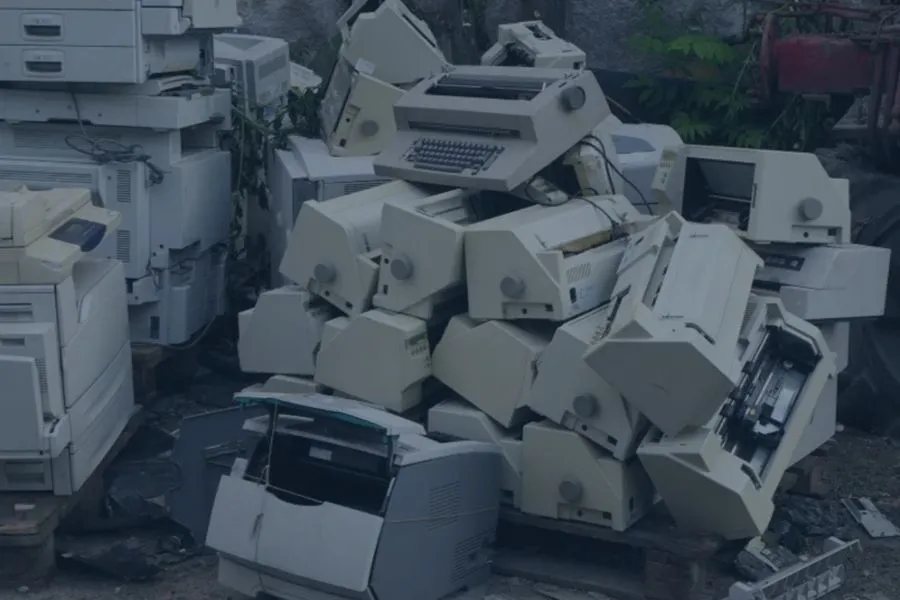
An old printer should not automatically go into the regular trash.
Printers can contain a mixture of electronic, mechanical, metal, and plastic components, including:
- Motors
- Wiring
- Circuit boards
- Steel components
- Plastic housings
- Power supplies
- Electronic controls
- Ink or toner components
Recycling allows these different materials and components to be handled through more appropriate streams.
For one printer, a drop off location may be the simplest option.
Businesses, schools, and offices replacing several printers may find scheduled pickup more practical.
For larger facility cleanouts or technology replacement projects involving printers alongside computers, monitors, networking equipment, and other electronics, an e waste container may provide a centralized collection option.
For a complete breakdown of the process, read our printer recycling guide.
Frequently Asked Questions About Printer Lifespan
How Many Years Should a Printer Last?
Most printers last around 3 to 7 years, but there is no single lifespan that applies to every model. Inkjet printers often have shorter lifespans, while office laser printers and commercial machines may remain in service much longer.
Do Laser Printers Last Longer Than Inkjet Printers?
Generally, yes.
Laser printers are commonly designed for larger workloads and typically have longer expected service lives than consumer inkjet printers.
A home inkjet may last around 2 to 5 years, while an office laser printer may remain useful for 5 to 10 years or longer.
Can a Printer Last 10 Years?
Yes.Some laser printers and commercial printing systems can remain in service for 10 years or longer, especially when they are properly maintained and replacement parts remain available. Whether keeping a 10 year old printer makes sense is a different question. Repair costs, compatibility, print speed, and downtime should all be considered.
Does Not Using a Printer Make It Last Longer?
Not necessarily. Inkjet printers can actually develop problems when they sit unused for long periods because liquid ink may dry inside the printhead and clog the nozzles. Printers generally benefit from being used within the workload range they were designed to handle.
Is It Worth Repairing an Old Printer?
Sometimes. A minor repair on a reliable printer may make perfect sense. Repeated repairs on an aging machine with hard to find parts may not. Compare the repair cost with the printer’s age, condition, replacement cost, and whether it still meets your needs.
What Should I Do With a Printer That No Longer Works?
Consider electronics recycling rather than placing the printer in ordinary trash.
Old printers contain electronics, motors, wiring, circuit boards, metals, plastics, and other components that can be separated during the recycling process.
Conclusion
Most printers last around 3 to 7 years, but the actual lifespan depends heavily on the type of printer. Home inkjets often last around 2 to 5 years, office laser printers may last 5 to 10 years, and commercial systems can remain in service for 7 to 15 years or longer. Maintenance, workload, operating environment, repair frequency, and parts availability all influence when it finally makes sense to replace one.
If your old printer is ready to be retired, contact EACR Inc. for printer recycling services. EACR works with businesses, schools, offices, and organizations managing individual printers, bulk equipment replacements, and larger electronics recycling projects.